A practical guide to OneToDo
Learn how the Today card, AI priorities, workspaces, focus areas, shared Notes, and team access work together.
Today and the top five tasks
The Today card shows up to five open tasks from the selected workspace. The AI priority agent considers saved task details, horizons, priority, due dates, and focus area. Adding, editing, completing, or deleting a task triggers a new ranking. Memory entries stay as reference and are not daily tasks.
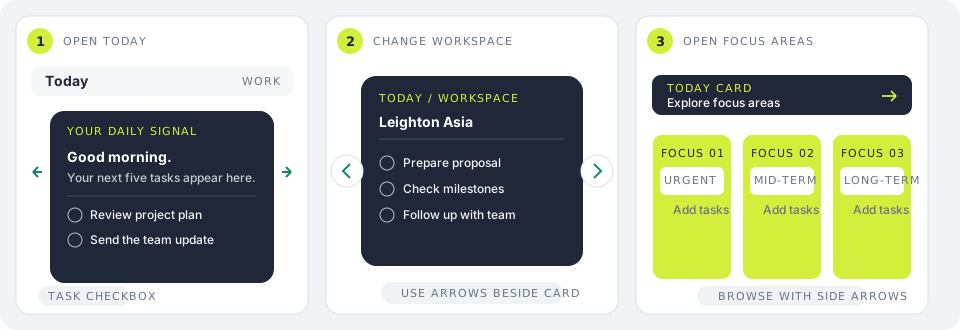
- Use the task checkbox to mark work complete.
- Switch workspaces with the arrows beside the Today card.
- Open the focus fan to browse each focus area.
Workspaces and focus areas
A workspace groups related work and collaborators. Focus areas organize that work into Urgent, Mid-term, Long-term, and Memory sections. Create, edit, or delete focus areas in Workspaces.
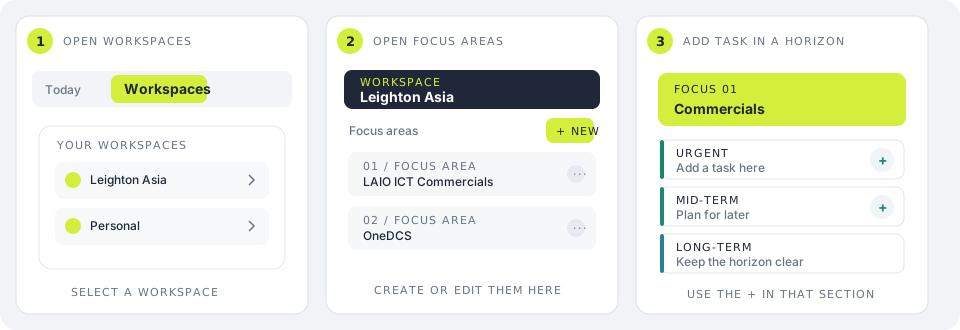
- Invite collaborators from a workspace and choose their role.
- Add a task directly in the horizon where it belongs.
- Workspace members see shared content according to their role.
Notes, pages, and handwriting
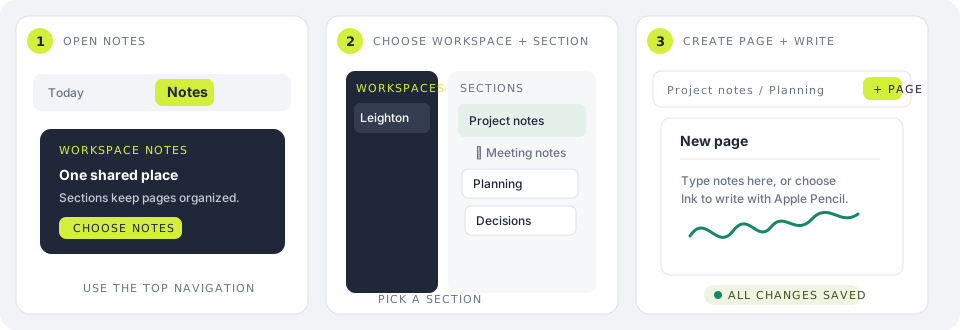
Each workspace has one shared Notes space. Use parent sections and one level of child sections to organize pages. Pages autosave; type with a keyboard, write on the page with Apple Pencil, add images, select and move ink, and adjust page zoom.
Move a page from its page-list controls to another section or workspace. Moving across workspaces changes who can access that page and its images.
Importing OneNote notebooks
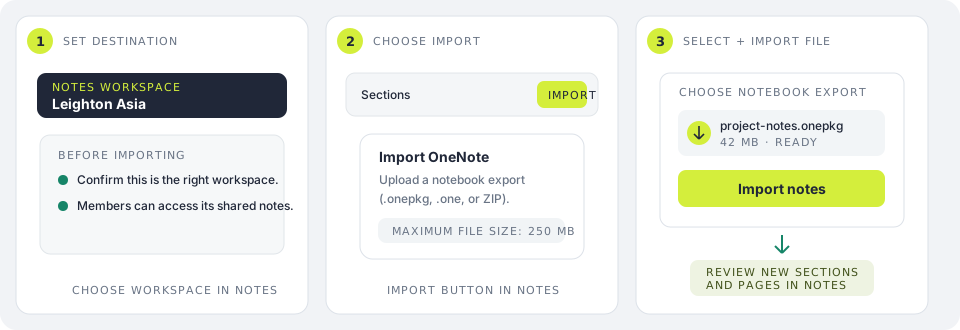
In Notes, choose Import to upload a OneNote .onepkg, .one, or OneDrive ZIP export under 250 MB. Supported sections and pages are added to the selected workspace. Some unsupported content may not transfer.
Display name and admin settings
Choose the account button in the top bar to change your OneToDo display name, open Privacy, or return to this Support guide. Your display name does not change your Clerk sign-in details.
Administrators can manage OneToDo users and select the AI model used for daily prioritization. AI ranks existing tasks; it does not complete or move them for you.